Home / Live demo
Live demo · PULSE · Home services

Walk Through a Business Running on One System

Meet Desert Peak Heating, Cooling & Plumbing: twelve months of calls, ads, jobs, crews and money, all in one place. Log in, follow the guided tour and see what an owner sees every morning.

5,000+ leads 3,000+ calls 12 technicians on the board Guided tour

A fictional company with synthetic data, built from the kinds of problems we fix. The results are illustrative, not averages or guarantees: yours will differ. Nothing you click sends a message, places a call or charges a card. The job photos in the demo are illustrative images, not photos from real jobs.

PULSE scoreboard: $114k gross profit from recovered calls, revenue by month and the funnel from ad spend to revenue
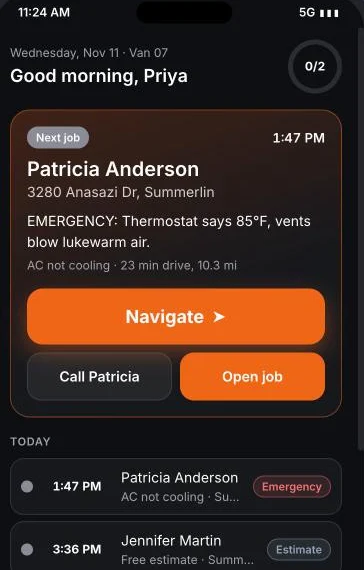
Technician app on a phone: next job, Navigate button, today's visits and route
The Story

One Owner, One Messy Phone Line, Twelve Months

Rick Alvarado runs a nine-year-old HVAC and plumbing company in the Las Vegas valley: 12 technicians, 3 office staff, about $4M a year. This is what he came to us with, and where he is a year later.

What he came with

  • 38% of calls never answered
  • 41% of leads replied to within 5 minutes
  • $12k a month in ads and no idea which ads worked
  • A Google rating stuck at 4.1

What we built: one connected system

  • Website and call tracking
  • AI phone operator “Morgan” and missed-call text-back
  • eCRM, pipeline, estimates and invoices
  • Ad-to-job reporting
  • Dispatch board and technician app
  • Reviews engine

The deal

One fixed monthly fee to build and run it; ad spend is paid by the client directly to the platforms, and telephony and AI usage are re-billed at cost plus a 10% handling fee. Goal: answer leads fast, see which campaigns bring in jobs, and run the whole business from one screen.

Twelve months later

Calls answered62%96%
Leads answered in 5 min41%88%
Enquiries booked (of leads)36%54%
Cost per paid job$280$160
Google rating4.14.8

$114k gross profit from recovered calls: about 1.5 times the retainer and setup fees Rick paid over the year (about 1.3 times once telephony and AI usage, re-billed at cost, are counted). It is a modelled estimate, not a measured result: it counts only the calls that would otherwise have gone unanswered if the answer rate had stayed at 62%, and nothing else the system does. The fees were earned back by month eight (month nine with usage costs). Your numbers will differ, and we will tell you honestly if it would not pay back for you.
Inside the Demo

The Whole Life of a Lead, From Ad to Invoice

A guided tour lights up the real screens one stop at a time, across seven stages. You can also skip it and click anywhere. Not ready to sign up? Every screenshot below is taken from the live demo (the job photos inside it are illustrative images).

1Attract2Capture3Answer4Book5Earn6Improve7Decide
Start here

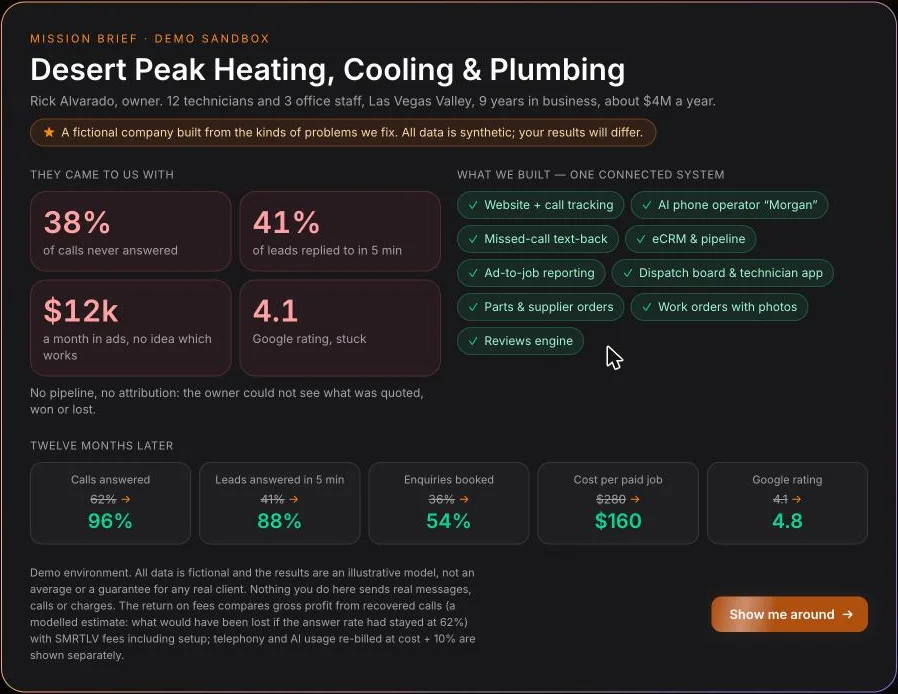
The client’s original brief, on one screen

What Rick came with, what we built and what changed, with numbers that count up as you read. Reopen it any time from the top bar.

Try thisClose it with “Show me around” and the tour starts.
Mission brief for Desert Peak: what the client came with, what we built and twelve months later
Guided tour

A spotlight that walks you through the real screens

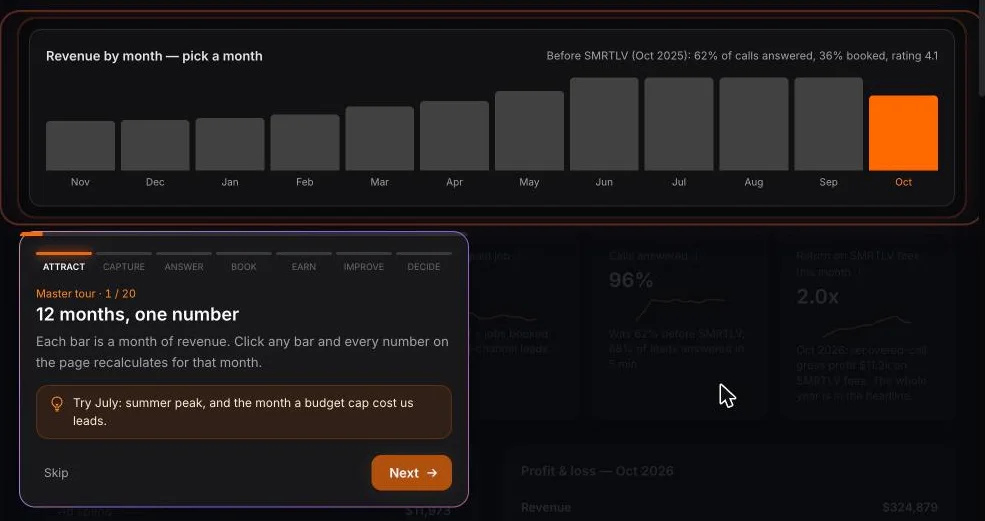
Everything outside the highlighted area dims, a short card explains what you are looking at and what to try, and the tour moves from page to page by itself.

Try thisClick any bar in the revenue chart: every number on the page recalculates for that month.
Guided tour spotlight on the twelve-month revenue chart with a step card
Capture & answer

Missed calls answered or texted back, fast

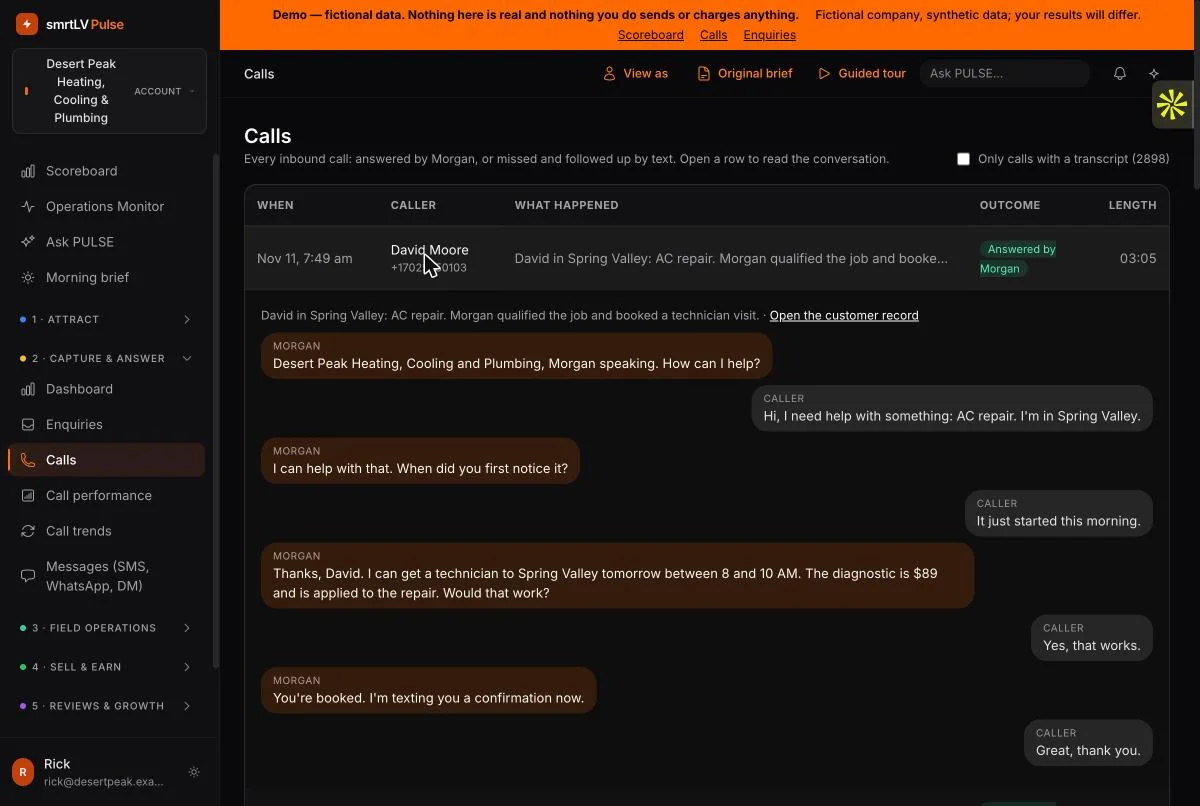
Morgan, the AI phone operator, picks up, qualifies the job and books the visit: 96% of calls were answered in the demo’s latest month. A missed call gets a text-back, in the demo always within 30 seconds. Open any call and read the conversation.

Try thisOpen a call in the Calls list to read the transcript, then look at Messages for the text-backs.
Call log with an open transcript between the AI operator Morgan and a caller who books a technician visit
Field operations

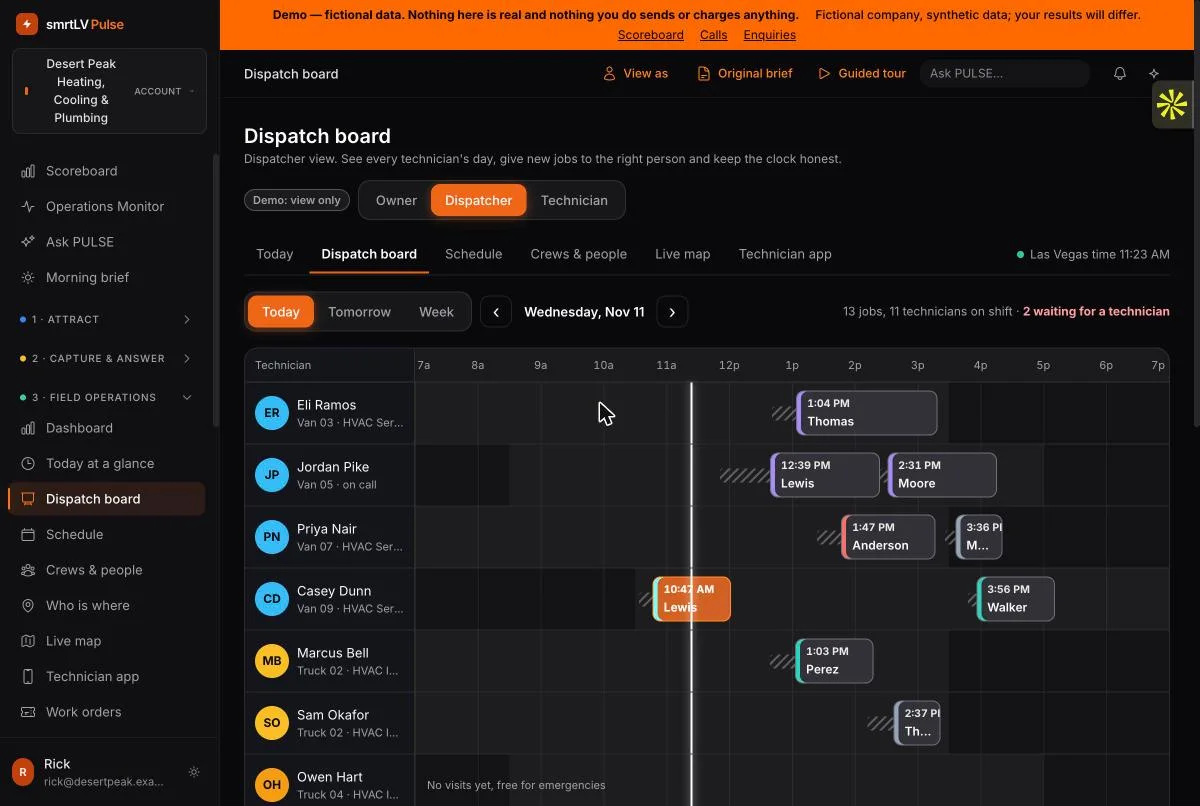
A dispatch board that shows the whole day at a glance

Every technician is a lane. Jobs are colour-coded by status and type, driving time is hatched, and unassigned jobs wait on the right for a dispatcher. Switch between Owner, Dispatcher and Technician views at the top.

Try thisClick a job to see the customer, the problem and the plan.
Dispatch board with one lane per technician, job blocks by status and an unassigned queue
Field operations

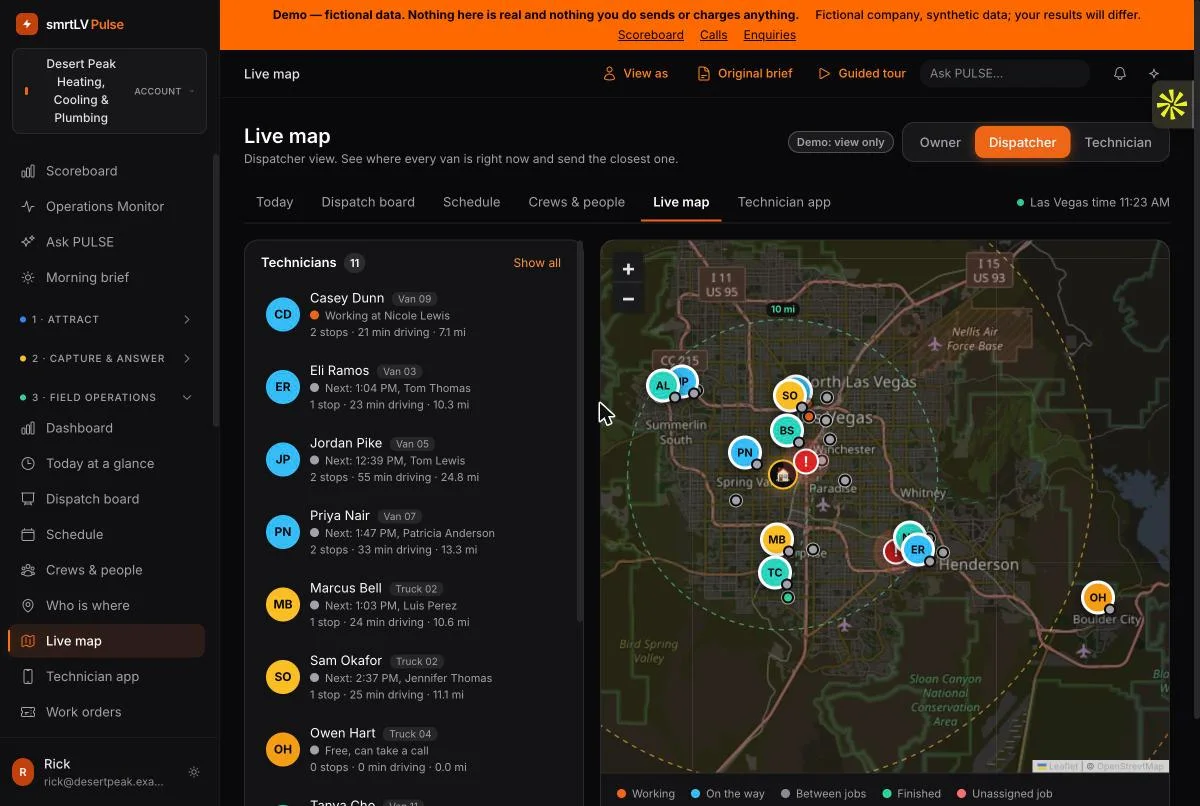
A live map of every van, with 10, 20 and 30-mile rings

See who is working, who is on the way and who is free, and send the closest technician to an emergency. Tap a technician to see the day’s route.

Try thisPick a technician in the list and follow the dotted route on the map.
Live map of Las Vegas with technician positions, job markers and distance rings from the shop
Field operations

The technician’s day on a phone

The next job is always on top with a big Navigate button, the problem in plain words and the steps for that kind of job. Tick the steps, take the signature, complete the job: the invoice and the review request go out by themselves.

Try thisOpen Technician app, choose whose phone it is and run a job to completion. Nothing is saved or sent.
Technician app: working-now job with Navigate, Call and Open job buttons, today's visits

And everything in between

Ads & campaignsWebsite trafficVisitorsMessages: SMS, WhatsApp, Messenger, InstagramPipelineEstimates, invoices & paymentsReviews & reputationEmail campaignsCalendarYour SMRTLV team & support
How It Works

From Request to First Click in Minutes

Demo logins are issued on request, so every visitor gets their own account.

1

Request access

Fill in the short form below. We email you a login and password within a minute or two.

2

Read the brief

Sign in and the original brief opens on one screen: the problem, the build and the result.

3

Take the tour

Follow the guided stops or click anywhere. The data is fictional and read-only, so you cannot break anything.

Request demo access

Get Your Own Login to the Live Demo

Tell us where to send it. If you run a home-services business, add a line about it and we will point you to the parts that matter most for your trade.

  • Real PULSE screens with a year of synthetic data
  • Read-only: nothing is sent, called or charged
  • Your own guided tour, ready when you sign in

Request your demo login

Your login arrives by email within a minute or two.

Our services are month-to-month with no minimum term; see the Cancellation & Refund Policy. We email your login right away and use your address to follow up on the demo. The newsletter is optional and the box is unticked by default: you get your login either way. If sending your login fails, we keep your request so we can send it by hand. See our Privacy Policy.

Straight Answers

What Is Real, What Is Not Yet

The questions an owner asks before trusting a demo, answered as things stand today.

Is this real data and a real result?

No. Desert Peak is a fictional company and every record is synthetic. The screens, the calculations and the product behind them are real. The return figure is a modelled estimate, so we rebuild it with your own numbers on a call and tell you if it would not pay back.

What is live in the product and what is not?

Live: calls, texts and missed-call text-back, card payments, your Google reviews, Google Ads data, the Messenger and Instagram inbox, and email sending. Reported by our team rather than a live feed: Microsoft Advertising and Meta ad spend. Planned: QuickBooks sync and a Google Calendar for each technician. The demo marks each connection as Live, Managed or Planned.

Are the job photos in the demo real?

No. The photos on the demo’s work orders are illustrative images, 31 of them reused across jobs, not photos from real jobs. In the product, technicians attach their own photos from the phone.

Does it sync with QuickBooks?

Not yet. A QuickBooks sync is planned and would be quoted separately. Today 30 reports export as CSV files (see the data question below for a full export).

Can I take my data with me?

Reports export as CSV at any time, at no charge, and our services are month-to-month with no lock-in. If you need a full export of customers, jobs and invoices, ask us before you sign and we will confirm in writing what it includes.

How do I move over from my current software?

It depends on what you have and how clean it is. Tell us what you use today (software or spreadsheets) and we will give you a realistic plan and timeline before you commit. We do not promise a one-day switch for a field team.

Does the technician app work without a signal?

The technician app is a web app on the phone that you can add to the home screen. It needs a connection. An offline mode is not built yet, so test it in your worst attic during the trial call.

What should a company like Desert Peak expect to pay?

Prices for field-service software vary widely and most large vendors do not publish them, so compare the total over a year, including setup, extra users, add-ons and usage fees, not the monthly headline. Our own plan for a company of this size (12 technicians, three office staff, about $4M a year) is in the calculator: open the Desert Peak plan and change anything. Our market notes and the questions to ask any vendor are in the calculator’s FAQ. We tell you honestly if it would not pay back for you.
What does it cost, and what is the contract?

Every service has its own setup and monthly price in the plan calculator, including the field-operations modules priced by team size. Services are month-to-month with no minimum term. Telephony and AI usage are re-billed at cost plus a 10% handling fee. See the Cancellation & Refund Policy.